
How CORAS.ai is Organized
Every feature in CORAS.ai — GARY, SmartLists, SmartBoards, SmartLanes, SmartGantt — connects to an underlying data structure. Understanding that structure is the fastest way to configure CORAS correctly, navigate confidently, and get mission-relevant answers from GARY from day one.
Users who skip this step often configure lists in the wrong places, can't find their data, or get generic GARY responses instead of answers tied to their actual program. This article gives you the mental model that prevents all of that.
GARY's context — and therefore the quality of every output he produces — is determined entirely by which SmartList he's reading from when you start a conversation. Users who understand the hierarchy can set that context intentionally. Users who don't get whatever GARY happens to see by default.
Configuration mistakes almost always trace back to the same root cause: something was built at the wrong layer. Understanding the hierarchy prevents those mistakes before they happen.
Every feature in CORAS maps to a specific layer. When you understand the layers, you understand why everything works the way it does.
The CORAS Data Hierarchy
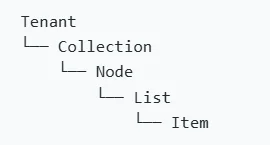
CORAS organizes data in six layers, from your organization's environment at the top down to individual records at the bottom.
Tenant: Your organization's dedicated CORAS environment. Everything — data, users, agents, configurations — lives here.
You have one tenant. Your CSM configures it.
Collection: A grouping of related nodes under a shared subject — a portfolio, a mission area, a command.
Collections aggregate data from child nodes automatically. Use them for high-level visibility.
Node: A workspace for a specific program, project, unit, or business function. The primary container for data.
Permissions are set at the node level. Users are granted access to one or more nodes.
Workspace: A focused, matrixed view within a node — organized around a specific process or topic.
Workspaces are horizontal views across a node. The Map is the vertical parent/child view.
SmartList: The structured data view inside a node where your team enters, tracks, and manages records.
SmartLists are the primary data layer GARY reads from. Set your context here before asking GARY questions.
Item: A single record in a SmartList — one contract, one program, one risk, one action.
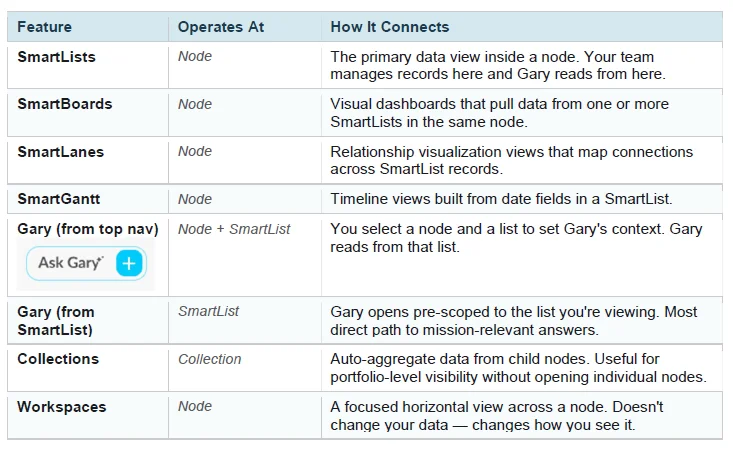
How Features Connect to the Hierarchy
Every CORAS feature operates at a specific layer. Knowing which layer a feature lives at tells you where to configure it, what data it can see, and why it behaves the way it does.
GARY's Context — The Most Important Thing to Understand
GARY's context — and therefore the quality of his outputs — is determined entirely by which SmartList he is reading from when you start a conversation.
Open GARY from a SmartList for the most direct, mission-scoped context. GARY opens pre-scoped to that list — no additional setup required.
Open GARY from the top nav for full-tenant access. You will be prompted to select a Node and a SmartList before the conversation begins.
If GARY gives you a generic answer, the most likely cause is context — check that you pointed him at the right list before assuming the question needs to be rephrased.
To get portfolio-level answers: Open GARY from the top nav, select the node or collection that contains all relevant lists, and confirm the correct SmartList is selected in the context panel. If your administrator has configured multi-list access, GARY can read across multiple SmartLists simultaneously — contact your admin or CSM if you need cross-list analysis.
How Data Flows Between Lists
CORAS data isn't siloed inside individual SmartLists. Several features move or connect data across the hierarchy:
Lookup and Multi-Lookup fields connect a record in one SmartList to a record in another — surfacing related data without duplicating it.
Transfer Items moves records between nodes when programs change ownership, phase, or organizational alignment.
Central Ingestion brings data from external systems into CORAS SmartLists, keeping your mission data current without manual entry.
Collections auto-aggregate data from child nodes, giving leadership portfolio-level visibility without opening individual programs.
Common Configuration Mistakes
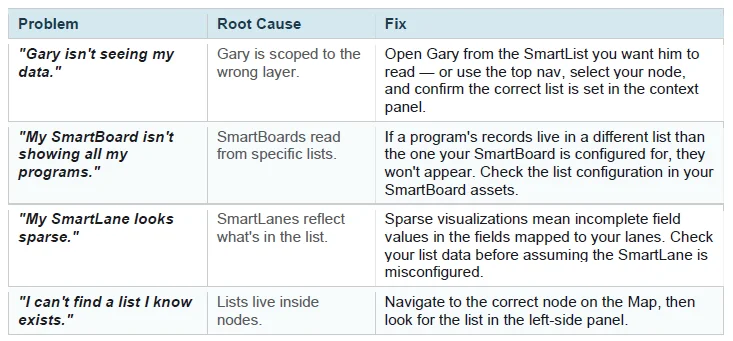
Most configuration problems in CORAS trace back to a mismatch between where something was built and where it needed to be. Use the table below to diagnose common issues.
The table below covers the most common mistakes new administrators make and how to diagnose them. If something in CORAS isn't working the way you expect, check whether it was configured at the right layer of the hierarchy.
Next article to Getting Data into CORAS.ai